I noticed this morning that my multi-step Conditional Forms’ required field validation is not being enforced – I can click through steps with required fields (leaving blank) and submit the forms.
I tried creating a form from scratch but experience the same issue. Required validation is working on single-step forms, however.
I realize this is from a while ago, but I’m curious if anyone has experienced any similar issues recently. Have there been any updates or improvements to multi-step forms that might address other potential bugs? Let’s get a fresh discussion going to see if anyone has new insights or tips to share about working with these forms.
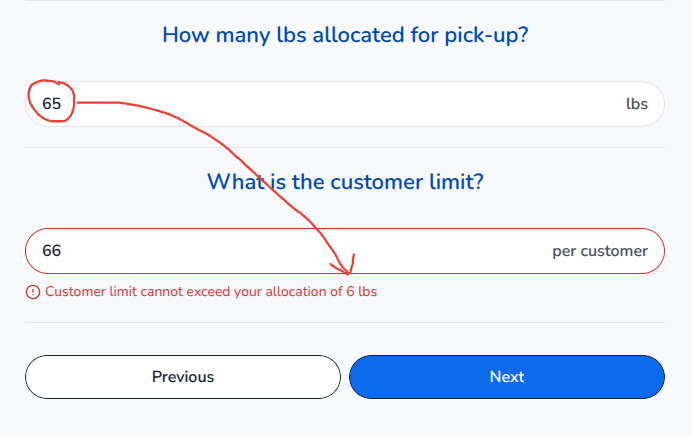
Validation is indeed glitchy. When a field’s validation is dependent on a previous field’s value, it doesn’t seem to change its parameters consistently or always correctly when you go back to the previous field and change it. I can tell because the {Max_Value} does not change or it only shows the first digit of the {Max_Value} configured in the error message.
However, if I go back to the previous field and hit enter in the field, the dependent field renders the error message with the correct {Max_Value} as configured. This is obviously not the way it is supposed to work and users will just get confused if this is not fixed. So, until Softr audits their form validation and fixes these problems, I wouldn’t publish forms with validation configured.
I would report this issue myself, but to be honest, chat support hasn’t been that helpful this year, and I’m on the Business Plan. @artur, could use some oversight with this, because it is a problem for conditional forms. We can’t use the features that have been added to them with confidence that they will work as intended.