I’m trying to configure a workflow which triggers when either the status or description fields are changed for any records in a table but can’t work out how to do this?
I tried used the Softr Database - when a record is updated option and then adding a filter but it doesn’t have the option to choose when a value changes.
Hi @sarah_h and you have “when a record is updated option” working and receiving data from the record when there is a field change in your database?
adding a filter but it doesn’t have the option to choose when a value changes.
You won’t need this if step one is working okay; you can go straight to another action in the workflow, knowing that the selected record is one with a change to either of those two fields.
Unless you do want this to be conditional on what the actual value change is (you would either be comparing before and after, or the new value to X (or not X). For comparing before and after, this gets complicated because the updated data is exactly that and doesn’t contain the previous values.
I only want it to trigger if certain fields change in the record but not every time the record is updated. The table is used to store projects and I have lots of fields in there including several related records fields so if it triggers every time the record if updated I would go through my allowance very quick. I need the workflow to know there’s been a change; check if the change is to the status or description of the project and if so carry on with the workflow. If it’s something else in the project that’s changed then it would ignore.
I currently have this option when I use automations in SmartSuite as I can add a filter to select a specific field in the record and say if it changes from ‘any’ to ‘any’ rather than having to specify a value
Understood. Yes, it is a limitation of that current Softr workflow trigger; it can’t be configured for “watching” specific fields.
I was wondering about “when record enters a view” as a trigger and your datasource having a conditional view as the trigger … but you need to have the condition to be “changes to field” and that isn’t an option, it has to be an actual value (or empty, not empty etc.). So I am now a bit stuck, but I will keep thinking.
I’ve started looking at if I can use a specific edit record form in the app when users need to change these fields and then trigger the workflow from that or set a hidden flag field. I need to send the updated information to a table in SmartSuite and have a make.com subscription which I can use too but I’m still quite new to all this so a lot has been trial and error
It is much easier to trigger workflows from in-app edits rather than changes made directly in the datasource. I’ve learned a lot this week about using webhooks, a whole lot of trial and error for me too, and recommend experimenting with them as a button action in your app. to then trigger your workflow. Happy to share more details about that if you’d like to know.
That would be great thanks. Most of the workflows I’ve seen so far focus on use of AI but that’s not something we are currently allowed to use in our company. I feel there’s a lot of potential with workflows but I’m a bit overwhelmed with it all and knowing where to start so any tips you can suggest is appreciated. I hadn’t thought about triggering with a button! Webhooks isn’t something I’ve used apart from when make.com generates them automatically for the integration
@GuillaumeDuv this is one of the threads where I have a workflow use case. To summarise, I have a table in Softr for ‘Projects’ which has lots of data fields and multiple related records across the database. However I also need to use the list of projects in my other data source ‘SmartSuite’ as it’s used by HR team and we’re not yet in a position to transfer them over to Softr. Therefore I need to some way to keep both tables in sync but just the Project ID, Client, Description and Status. Softr would always be the master source of the data where any changes would be made so I need a way to push updates to SmartSuite (check if record exists, if yes then update, if no then create)
This would be great to run through in a live workshop if possible?
I also have a similar request but going the opposite way. Master source of data for personal needs to got from SmartSuite to Softr when added or changed.
Another workflow, which I have nearly working is to generate a list of default project tasks for a new project based on the type of project it is. I have a tasks template table and the custom workflow seemed to work but problem is that I can have about 200 default tasks for a project and the workflow only seemed to generate the first 110 tasks (not sure if there’s a limit with the bulk (loop) action)
Also, with the new docs Automator native trigger, I’d like to then be able to create a neatly formatted pdf of all the project tasks and their status that we can easily send to our clients (not all our clients want to use the online system and have strict requirements on the format we need to provide things to them)
I have lots more use cases but this is the main ones for now I think. Mark and I are have a arrange a sessions ourselves to discuss and compare what each other is doing but I’d been keen to run through as a group if possible.
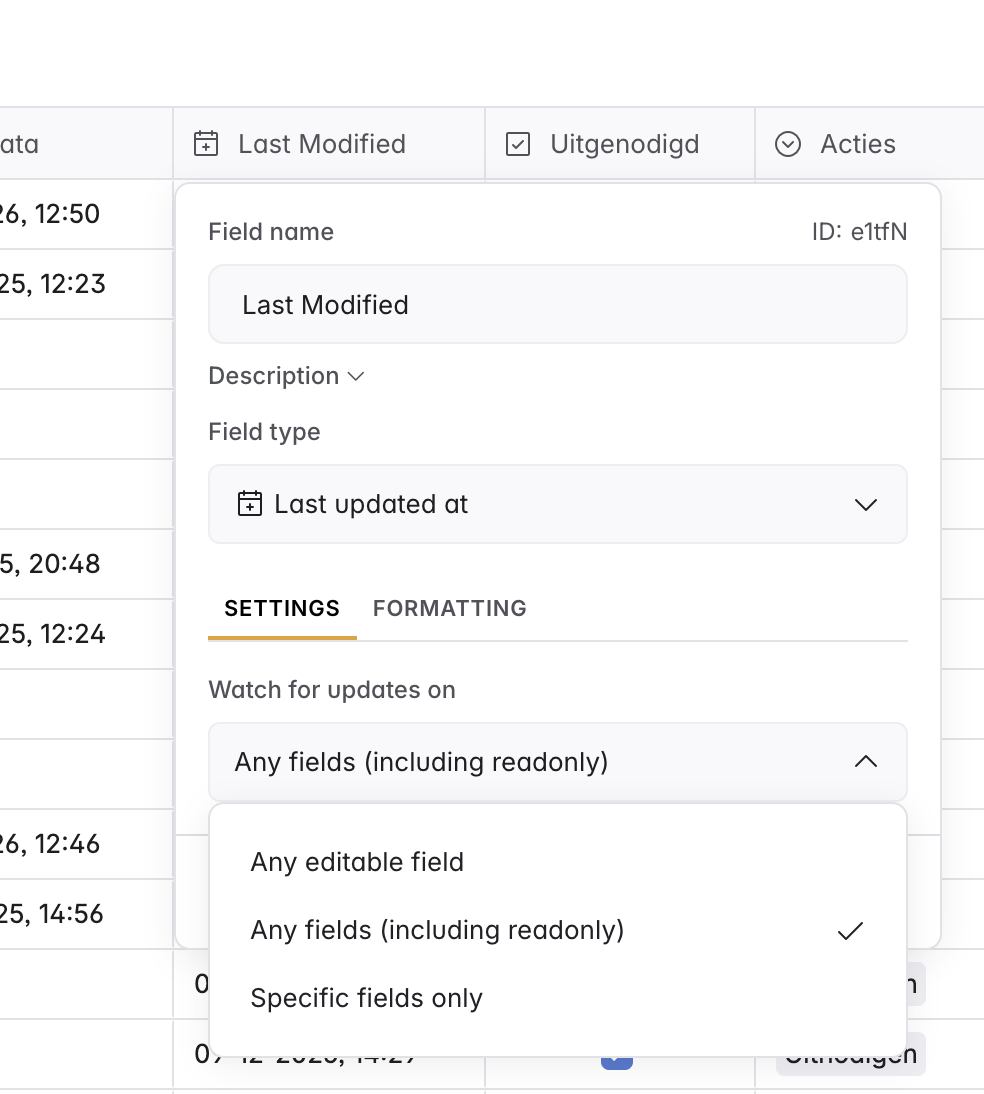
Thanks - I didn’t even realise this existed. I think this could be a solution for me if I use the specific fields option and then base my trigger on that
If you’re using Softr Databases you can configure such a field that gets a timestamp of the latest record update for selected fields and you can map this field to a workflow trigger to ensure your workflow triggers whenever one of those fields is being updated.
Then, you can call Smartsuite’s API to edit the mirrored records there.
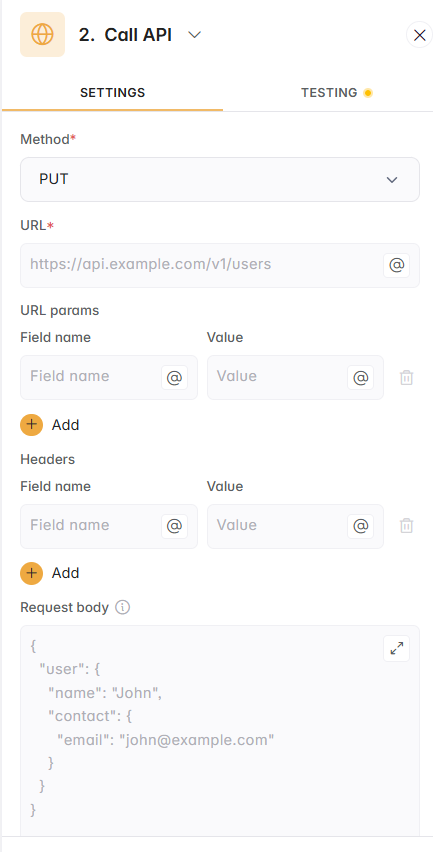
Thanks Guillaume - I’ve just added a Last Updated field to my projects table in Softr to update when the Client, Description or Status changes and I can now use that in a workflow to trigger on when that field is updated. Unfortunately my api knowledge is very limited. Is this something you can provide help with? I have full access to both systems to get the info needed but I’ve just not sure what I have to type in this section:
So you’ll first have to generate your Smartsuite API key which is your unique and secret key to make API calls and interact with your Smartsuite workspace via automation.
From there, if you’ve got a good idea of the schema of the database table you’re looking to create records in, you can provide that information to any AI assistant (like ChatGPT or Claude) and provide the details from the Smartsuite API documentation about creating records (available here) and it will tell you how exactly you can set the API call (URL, headers, body JSON that you’ll be able to copy and paste).
For some values of the body of that API call you’ll then be able to map workflow variables (with the @ icon) to ensure the right records are being created.