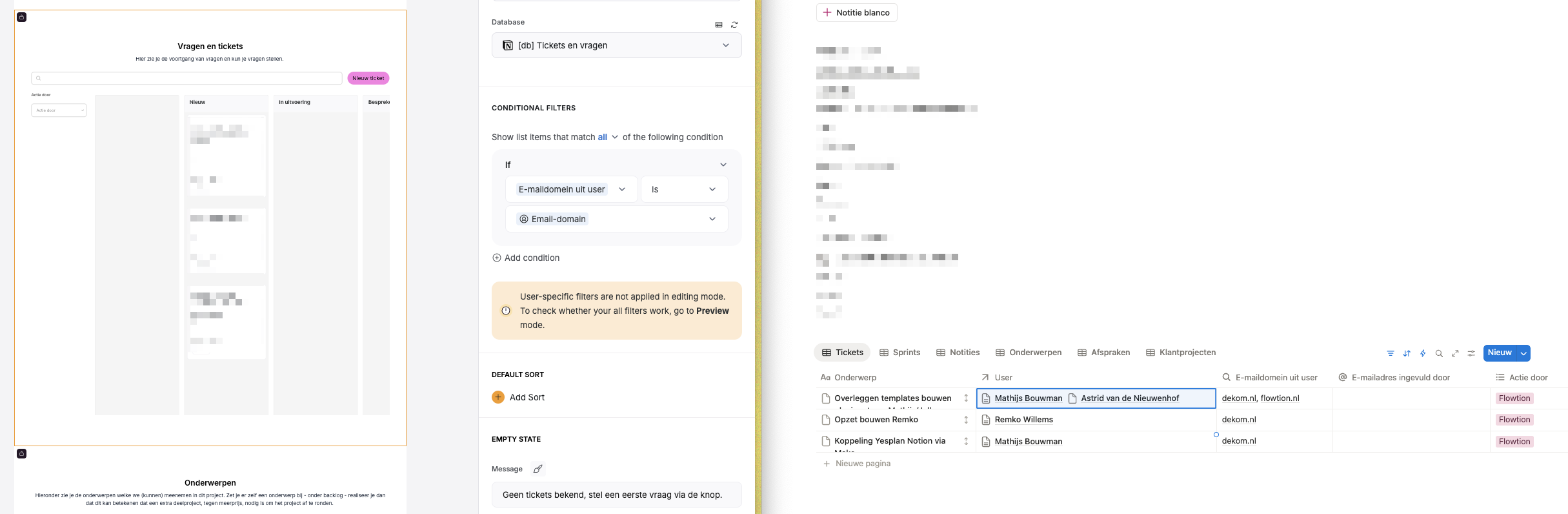
I’m building a client portal for my customers. Each client usually has multiple team members who should all be able to submit tickets and see each other’s tickets. So far, no problem.
But of course, I also want to be able to respond to my clients’ tickets. The issue is that since I don’t have an email address under my clients’ domain, I can’t see the tickets myself when I log in (I can see them in Notion, but not the comments).
Each ticket has a detail page with a comment function, and every ticket is related to a user database.
Has anyone found a smart way to handle this? If I add myself as a user and use a “contains” filter, I still don’t see the ticket. Or is the only option to create a separate user group for each client and manually add myself every time? Hopefully not
When you say “"respond to my client’ tickets”, are you referring to tickets that they have submitted to you as the client portal owner, or tickets that are imported from Notion?
If tickets imported from notion:
You could duplicate the kanban block, set visibility to just yourself, and remove the conditional filters that limit the results. Add in a filter or search option based on email domain to help you focus in on just a specific client.
Another option could include moving off email domain and creating a new column to track company membership, then also add yourself to each company.
If tickets to you as the portal owner:
Setup another notion instance that logs and tracks those tickets separate from your existing ticket instance. Give users a page where they can submit tickets to you and see progress, and setup a view on that page so you can see the tickets they have sent for you to work
It is the second situation. A situation that happens quite often: someone from a team submits a ticket/question, but before I can make the change, I still have a few questions in return. I want to ask those using the comment function. The person who submitted the ticket replies, and I might respond again with a video showing the change I made.
That way, when colleagues see it later, they also understand why something was changed. Then the status moves to “completed.”
I don’t think that would work with an extra database, as you suggested. Or am I missing something?
Thanks for clarifying. So you have a method working for them to submit tickets to you, and you’ve enabled comments ( Comments block – Softr Help Docs ) but you cannot see the comments that your users are posting?
Yes, I’ve enabled the comments. I don’t see the tickets, because of the filter ‘domain of user’ and I don’t have an e-mailaddress with the domain of my client.
And I can’t manage to set the filter like this, ‘domain = customer and my own domain’.
Ok, the problem is with your conditional filter it seems. To fix this we need to make a couple changes:
On your users table, add a new column called “supported domains” or something similar that will contain the email domains that you (or other customer support reps on your team) need need to have access to.
Locate your user record and add the email domain for each/all clients that you currently have on your portal
On the ticket details page, update the conditional filter from ALL to ANY, and then add a second filter that says if “Email Domain” is any of Logged-in Users “supported domains”
This should allow you to see the tickets for your customers and scales if you ever add more team members and want to split up responsibilities (like an account manager)
Note: every time you add a new client with a new email domain, you need to add that domain to the “support domains” field on your user account. This can easily be automated via Softr workflows.