I was wondering if you could have only a time feature instead of having to select a date and time. Currenlty you can turn off the time, but not the date. It would be nice to have the time only. For example i am working on a practice input system for a swim team and need to be able to select date for one field and time for another, but the only way to select time is to have the date as well.
Hi @heintzberger , welcome to the community 
This makes sense as an ask, and a couple of questions before I suggest anything concrete, since the best option depends on your setup:
- Which datasource are you using for the practice data - Softr Database, Airtable, Google Sheets, or something else? Softr Database now has a duration field that might work here, but the options are different for the others.
- Where are users entering the time - a form block, or inline editing in a list or table?
- What happens to the time after it’s entered? Just displayed and sorted, or does something act on it, like a reminder or an automation?
- Is the time fixed per practice slot (say Tuesday practice is always 6:00 AM), or does it vary per session?
I asked the last one particularly as if the time is tied to a specific date in practice, there are ways to keep the date and time in one field but still give people two separate inputs. If it’s a standalone time that repeats, that’s a different setup.
Hi David,
I am using a softr Database for a swim practice system. I am entering these on a form and then they go to a calendar block. I want to have a practice date, start time and end time. But for the calendar they all need to be date fields. I tried using select field but it won’t work with the calendar. The only solution I found was to just add three date fields with time on two of them. I am using an automation (at least im working on it) to create weekly practices. Once the practice is created the time stays for that day. The practices are not always at the same time each week.
If you have a solution I’m all ears. Thank you for your response. Some of them do repeat. I have it set up with a repeat option as well. They are usually the same by week, but they change sometimes depending on who is using the facility that week. Let me share the form. For the top part of the form I would like to put Date, then start and end time if repeat is selected, then the bottom part of the form shows up and select the start on and end on for the repeat as well as the days it repeats. But, the top part of the form i have to enter the date twice when all i really want there is time. I had a practice date field and deleted it due to having the date on the other two fields. Anyway I am rambling. Thanks again for your help.
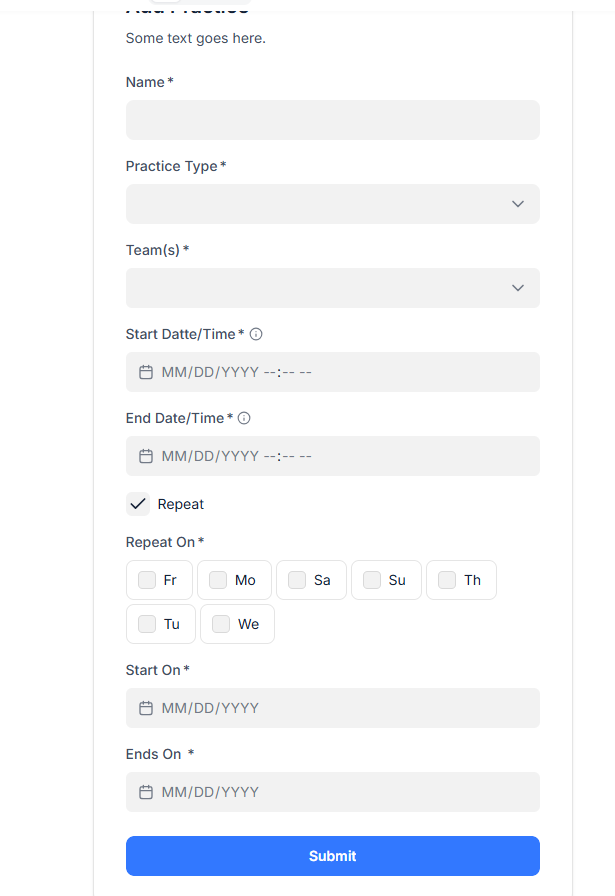
Thank you for the details.
What if you create that form using Vibe Coding block, and show there one field for the date only, and another field where you would be able to pick the time only? Of course, you would prompt the block to understand that the selected time only refers to the date that was selected before that. It will be saved in the database as a date & time field again, but at least on the front end you will have a better UI/UX. Wdyt?
That wouldnt be a bad idea. I’ll give it a try