TL;DR: Need role-based access (admin, editor, user) in a 5-person portal, but the Basic Plan only allows “logged-in” and “visitor.” Any workaround?
Hi.
I have a small portal I’m building at work (an edu institution), with maybe 5 users at most, all of them internal. The portal contains sensitive content that only some users should be able to see/edit.
There are three roles within these 5 people. One is admin, one is editor (who edits private content) and one is general user (who is able to view and edit internal but non-private content).
- We don’t want the general user to be able to view or edit private content, so they should have no access to pages or blocks aimed at the editor.
- We don’t want the editor to be able to toggle admins controls, so they should have no access to pages or blocks aimed at the admin.
- The admin should be able to access everything (is this its own role or just ‘any logged in user that is not the other two’?).
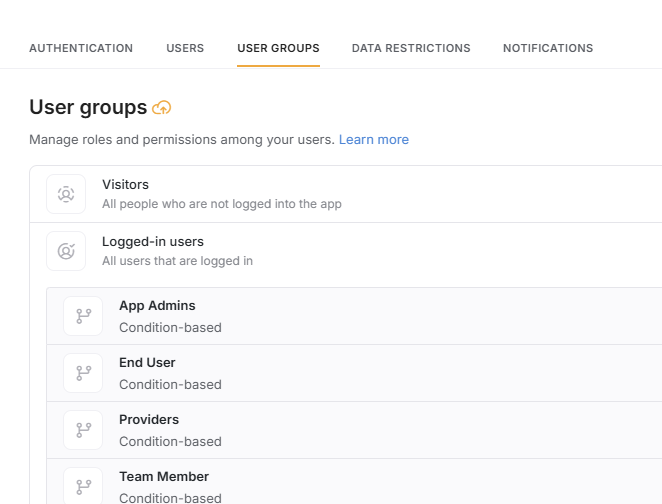
Am I right that this dilemma is solved by having a user groups for each role and limiting visibility based on that? If so, I am really struggling to find a solution because:
- Given only 5 users, I’d be unable to justify with stakeholders anything more than the Basic Plan.
- But the Basic Plan only has two default user groups of logged in and visitor users.
The portal is all built and ready, except for this one major hurdle. Any tips?
Thanks.
JM
If you are staying with Softr.io you will indeed need a professional plan. Ask for the 30% educational institution discount to soften the blow.
Add a “user type” field to your users table with the different access levels you are looking for. Then in the user groups section, create groups based on that field
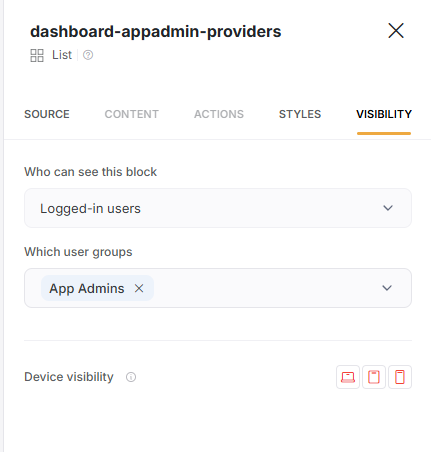
Then on the UI in visibility settings, you can drill down to the specific groups that are needing access.
I’ve had a similar problem. As a non-profit community group I would struggle to convince them to spend out on anything higher than the Basic plan, even with the 30% discount.
A sort of workaround is to set up multiple apps which will have different URLs and then only give the relevant URLs to the relevant users. It’s not perfect because all of your users would be able to access all the apps if they know the URLs so it’s whether you can keep those from the people who shouldn’t see them or not. And you are limited to a maximum of 3 apps on the Basic plan.
1 Like
Thanks,. Yes, that discount definitely helps. But before I build things out further and fully commit, I wanted to know whether my use case above would necessitate the Pro plan (i.e. more than 2 default user groups), which would be a very different bill.
Just reviewed the plan limits, to get custom groups you do need the pro plan.
Original response (incorrect details)
Logged-In and visitor are not user groups, at least not from a plan limit perspective.
The basic plan allows for 5 custom made user groups, which based on your use case is what you would look to create.
That’s right, as I mentioned before, you would need a pro plan for what you have described. Plans below this have two default user groups: logged-in and non logged-in users.
1 Like
It’s not necessarily a 100% workaround to more user groups, but most (or all) dynamic blocks and action buttons can have its visibility limited by pretty much any field in your user table. So you can classify them using a select field, or even just use each person’s name since you only have 5. That way you can hide any element, and also filter lists, according to one or more values tied to the logged in user. It can take a bit of creativity, but it’s generally achievable.
If you only have 5 users, simply filter views and access by user name. Not ideal but fine for a small MVP.
1 Like
That’s what I had in mind as a fallback, though not ideal as it wouldn’t hide the pages or blocks themselves in many cases, so not the best UX. Also not to keen on doing these filters now, and then switching plans and having to make changes to visibility settings and filters again. But probably the best fallback option. Thanks.