It would be really be helpful to be able to click the header of a column in a table and sort. This is pretty basic table functionality and it’s aggravating that it’s missing.

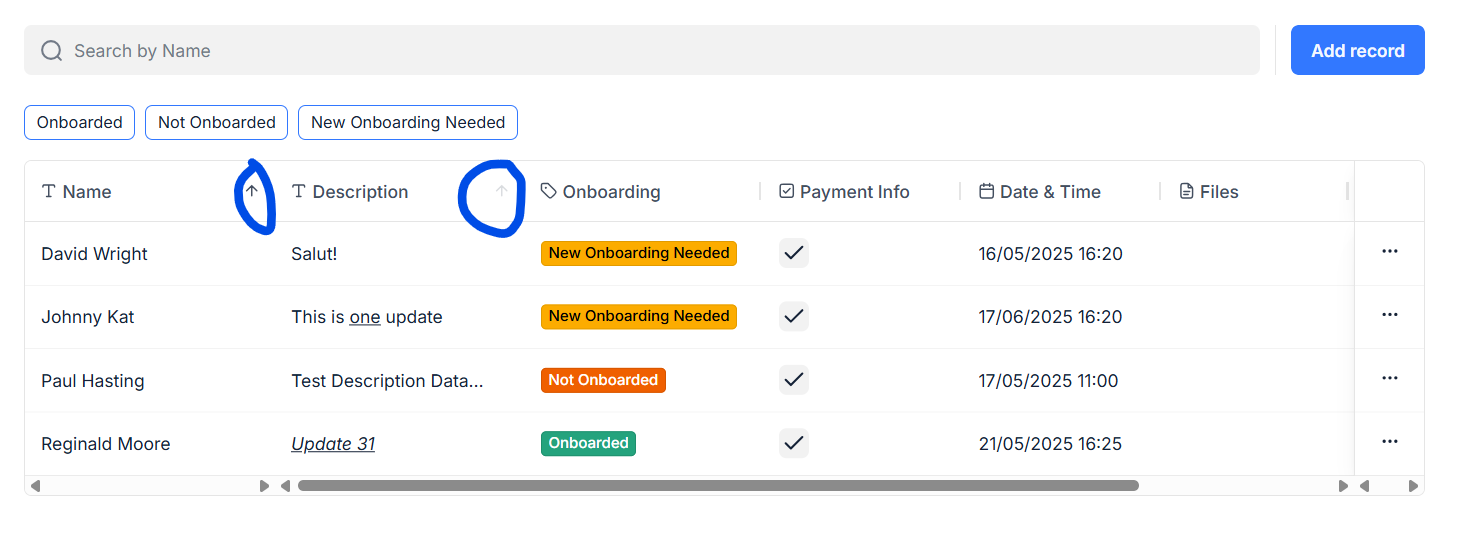
That’s the first time I’m seeing that functionality. I’m looking at the tables I’ve created and I’m not seeing it. Any insight into how to activate this?
If you add a new table block does it appear?
If not => it means you use a too old version of the table block (and it’s not possible to add the sorting functionality).
When adding a new table block the sorting functionality automatically appears.
Can you confirm?
Note: the arrows to sort appear on hover on the header of the the table block (preview or live mode)
Ok. I see that. So, I assume that I need to replace and reconfigure any tables from the old “new table” block to the newer? “table” block to make this happen? There’s no way to switch without completely reconfiguring new blocks, correct?
Yes, exactly — replacing the tables is mandatory.
When you add a new table block, preview it and you should immediately see the up and down arrows.
Thank you. Much appreciated.