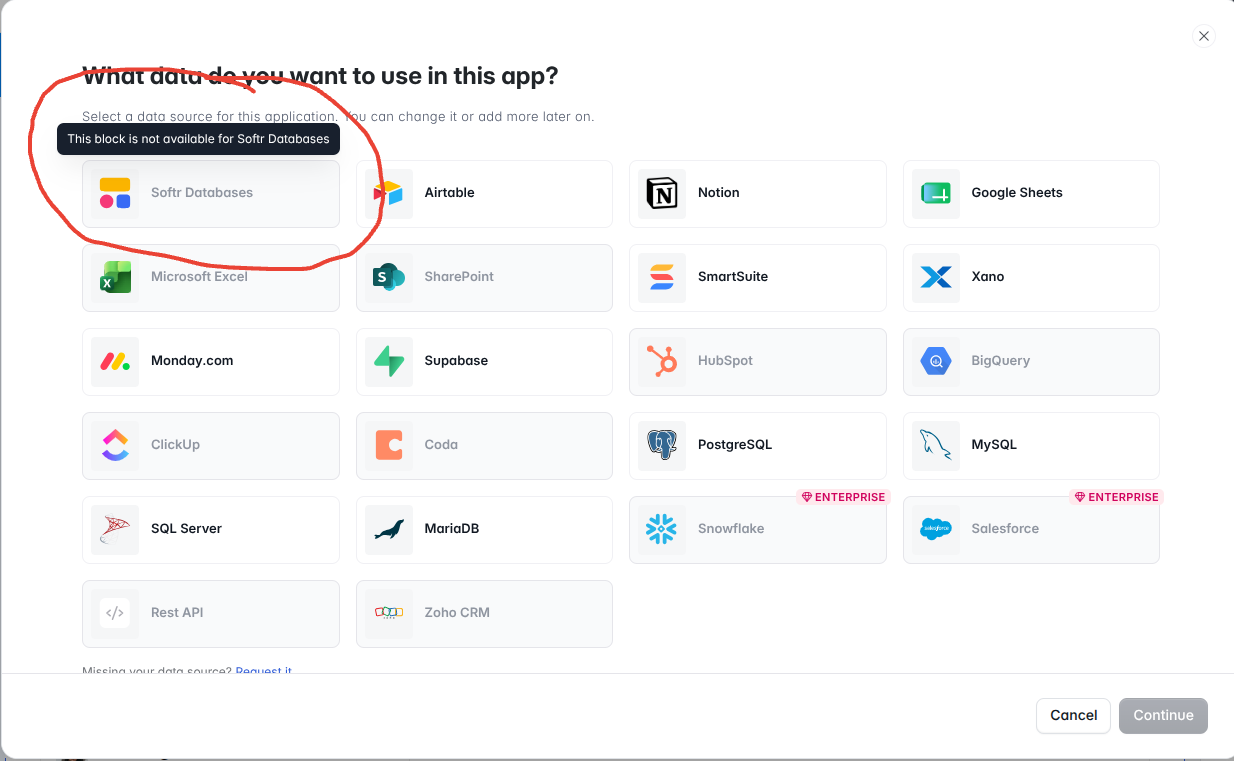
For some reason, I am not able to use Softr Databases inside my Live application.
May I missing some integration Step?
Specifically it is not avialable inside Inbox block.
Just tried the list block - it seems to be available.
Alson inside list block the long text field does not have Rich text. Is that correct, I tried markdown and XML seems like not working.
See the screenshots below,
I have created a Static Base table in softrdatabases
It says its available to use
But When i am trying to integrate within my app. it does not show up as an option to select.
Hi @AmeerKhatri6167,
Thank you for your post. The Inbox block is one of our older blocks, and we’re currently working on a new and upgraded version of it. The updated version will also include support for Softr database.
We’ll make sure to let you know as soon as it becomes available.
@artur, do you have any updates on this “new version” of the inbox block? When will it be released and which datasources (ex. Airtable DSV2) will it integrate with? This is another great feature that’s been barely supported over the years.
Hi @sveta.ohanyan and @artur. It’s been over a year since this was announced. Any plans made for the inbox block based on this info have been futile. They still don’t work with Softr databases, modal back buttons, … Since no one can use it, will it be deprecated?
@Aramo. What exactly do you mean? Should I modify inbox blocks or create one from scratch? What prompts should I use to get inbox blocks to integrate with a Softr database or have back buttons on modals work with them like they do with other dynamic blocks?
Appreciate the details here, in the community, since support has already told me to simply use AI.
@Ben I would encourage you to just experiment using the vibe code assistant. Treat it like a human collaborator. For example you might say “I want to build a 2 column, gmail style inbox view for my Messages (for example) table in this app’s Softr DB. Clicking on a message in the left column should show the Message Details page for that message in the right hand larger pane.” Note for this example you would already want to have a Message Details page which shows the details for your message items in the table.
You will quickly find that the vibe coding tool can create super powerful interactive “inbox” style views with way more packed in than the old built in inbox could ever give you. You can keep talking to the AI to iterate and refine.
Thanks @jb1. But again, what prompts should I use to get inbox blocks to integrate with a Softr database and have back buttons on modals work with them like they do with other dynamic blocks?
The last we heard was that inbox blocks do not connect with Softr databases and I verified with support that inbox blocks were not included with recent modal updates, so modal back buttons do not work with an inbox block. We are tired of advice telling us to simply use AI, as if it’s a silver bullet, when it is far from it.
Again, do not use native ones. Instead, ask the AI vibe code builder (the input field at the top of the sidebar that lists all blocks when you hit + to insert a new block on the page designer) to create an inbox style ui for you and you can just type to it asking it to connect to data from X table. The native built in inbox blocks from softr are outdate at this point and you can get better results and more powerful UI with more customization capability by asking the ai to just make one for you. The AI knows how softr’s built in modal system works and can implement links the open modals if asked “please make this button open using a softr modal”. Softr is an expansive platform. It is not reasonable to expect every single type of block be updated all of the time given the pace of progress. If you try any other low code builder like Knack or Bubble by comparison, I can assure you your frustrations will mount much faster having recently switched from those two.
@jb1. Can you provide a link to an example of what you’ve described before we go to the trouble of creating this custom AI inbox block? I suspect this will require an unreasonable amount of prompts, and as a result AI credits.
It’s perfectly reasonable to expect Softr’s native blocks to work. If not, they shouldn’t be available for builders to waste their time configuring. By your rational, we should expect all of Softr’s no-code blocks to eventually be replaced with AI.
If you search for “inbox” you’ll see that Softr has had plenty of time to update it. It is an original block that they’ve simply neglected over the years.
@artur, we were told that the Inbox block would support Softr databases well over a year ago, but it still doesn’t. We don’t understand how a dynamic block is still missing integration with its own native database?
Honest read is I wouldn’t wait on the native inbox block, it’s been stagnant for a long time. A list block in a two-column layout pointing at your messages table gives you the inbox look you want and it reads Softr databases today.
I don’t see how that will give you the same layout as an inbox block where you are essentially selecting a list item on the left side of a page to see its item details on the right side of the page, in order to compare different items by scrolling and selecting down that left side list.
Fair point, it won’t be exactly the same. The practical version is a list block in a narrow left column where each row links to a details view. You lose the side-by-side compare, but you get a working inbox today instead of waiting on the native block.
Thanks for the suggestion, but what you’re describing is not even close to the same layout AND functionality of the inbox block. You’ve simply described how list and items details work together.