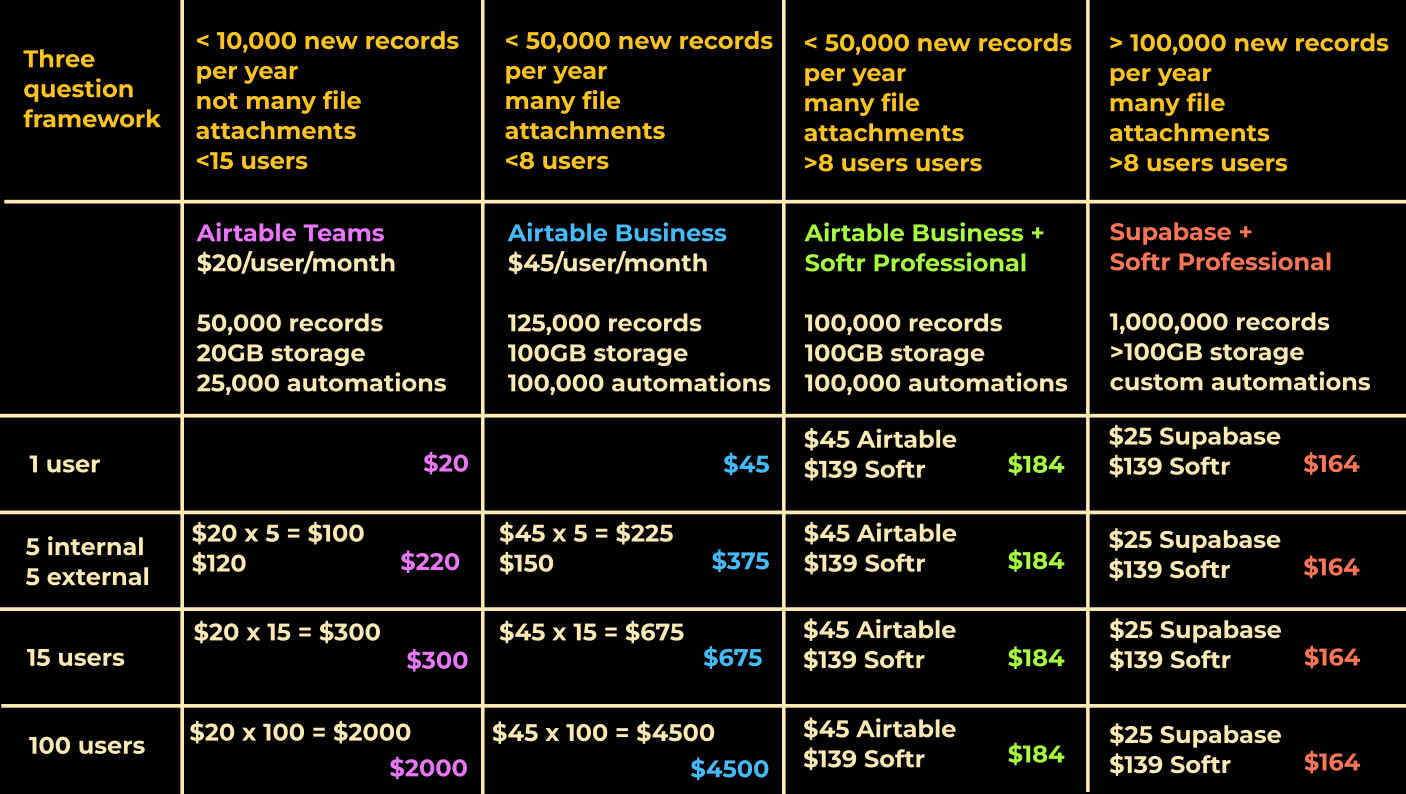
As part of a pricing discovery we made for a client, we ended up comparing the price of using different tech-stacks for building a business automation dashboard. We compared the most reliable tools out there: Airtable, Airtable+softr and Supabase+softr for different use cases and scenarios.
If you are looking to manage your monthly expense for business dashboards, feel free to check out our price comparison video here: Youtube video link
Thanks,
Kalai
P.S. I still cannot figure out how to directly embed the youtube video in here.
Great video! It shows the benefits and drawbacks of using the three platforms alone and together. Essentially, for small projects use Softr alone, med size use Softr plus Airtable, and large projects Softr plus Supabase.
In theory, it makes sense economically. In practice, when the implicit cost of time is involved, builders want SAAS that just works though, whether alone or integrated. The question I have for the community involves their actual experience with Softr by itself, with Airtable, and with Supabase. So far, we have to rely on Softr to tell us about Softr, while many of us have experience with Airtable plus Softr, and not much is shared about Supabase plus Softr, here, in the forum.
For long term Softr builders, like myself, what are your thoughts and more importantly your experiences with the usability of these platforms for your use cases with actual users?
We regularly use Supabase as the backend for our clients - primarily because we are a bunch of developers and it is pretty easy for us to set up Postgres databases and sql functions. I agree it has a bit of learning curve for someone with absolutely no coding experience. But when once set up well, we found that our clients could scale very easily, the user experience is fairly identical to using softr alone (because the API limits are generous in supabase). For file attachment fields, we use a trick in supabase. All forms of lookup, linked records, rollups can also be easily set up in Supabase if you know a bit of SQL.
Of course, I could be biased because of our background - happy to listen to others for their experience.
The best experience (and price) is when you leverage Softr as a full stack builder, having the data, logic, and app in one place, beautifully connected.
Have you already given a try to our databases and workflows?
I have - but I think the automation runs and records limits are very limiting for many of my use-cases. So, I prefer going out of Softr for a lot of big projects. Of course, for quick building of MVPs, I use a lot of native Softr features.
I’m also working on Softr & Supabase. Curious to hear about the trick. Why do you need one, or what does it do?
Just so you know, I’ve been in AT for over a decade and have a good grasp of SQL and programming. While I think AT’s automations and main database features are better than Softr’s native database, for my current project, I chose to use the native database (mainly for performance reasons). Sure, you might need to get creative sometimes, but I think it’s good enough to get the job done.
I’d suggest using AT with interfaces for smaller teams and non-mobile projects. To be honest, I haven’t run into Softr’s database limitations yet, but we’ve already been discussing enterprise solutions with them. As you’d expect, they’re great to work with, and if performance becomes an issue, we can always switch to SB with other tables.
And I’m super curious to know what kind of projects require so many records or work to action. Do you mind sharing a bit about the types of apps you’re building here?
Not sure if sharing a public app would help - because most of the differential work is done in the Supabase backend and we end up only replacing the data source in Softr to Supabase.
I have a walk-through demo for an example of Rollups done within Softr tables natively as well as in Supabase here: https://www.youtube.com/watch?v=3sJto5DuqFg
In short, we need to write an SQL function for a “view”. Relevant code is also provided in the associated blogpost if that’s something you are interested in.
So, uploading files in table fields translates to uploading the files to a storage and retaining the file URL in the field. So for viewing, deleting and modifying these files within Softr in a natural way, we have a couple of scripts to aid.
Glad to know your view on Airtable, Softr and Supabase, and I agree
Sure, anything that has timestamps associated with it, as you can imagine. Say, biometric attendance management for 200 employees will result in at least 200 records per day. If I would like to keep the records unarchived for payroll or performance monitoring for at least a year or two, then I run into the limits. Or say, I want to monitor IT logs of a company - again this can result in hundred records per day. I agree these may not fit the typical use-cases for Softr.