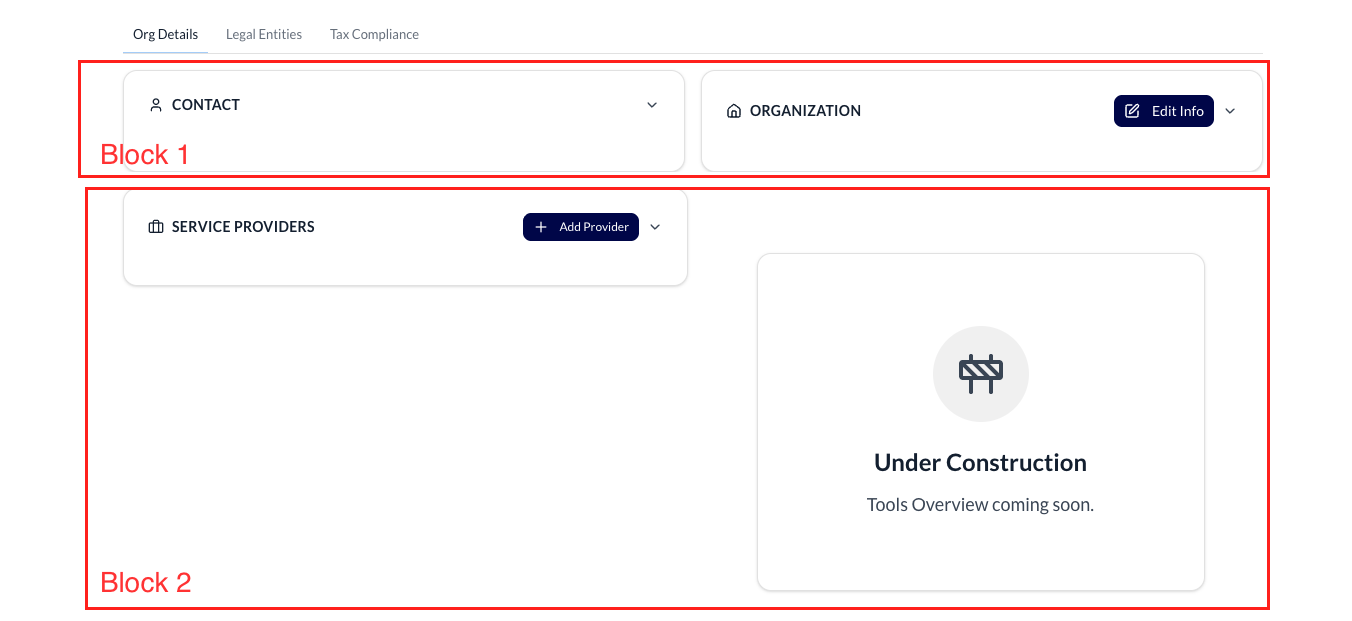
HI, I’m trying to put two blocks inside a tab. (In reference to the picture) right now only block 1 is inside and I’m struggling to figure out how to get block 2 under it in the same tab.
Thanks so much!
HI, I’m trying to put two blocks inside a tab. (In reference to the picture) right now only block 1 is inside and I’m struggling to figure out how to get block 2 under it in the same tab.
Thanks so much!
@oregano This is a common Softr limitation.
A tab can only contain one parent block. To put multiple blocks in the same tab, you need to wrap them inside a Container / Section block, then place that container inside the tab.
So the structure should be:
Tab
Container (or Section)
Block 1
Block 2
Once both blocks are inside the same container, they’ll appear together under the same tab.
@oregano there should be a plus button at the end of your first block to click and add 2nd or more blocks inside a tab… you can use containers too but you don’t have to