Hello. I am creating something and need a way for people to share and invite to others on social media. I am stuck on trying to get this part. Any suggestions?
1 Like
Thank you Suzie
1 Like
1 Like
That’s a great starting point!! Thank you!
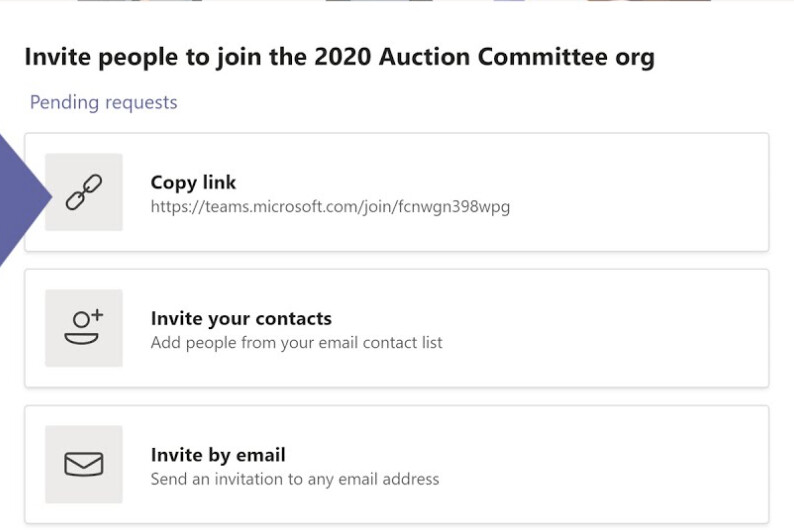
Ultimately, I think I’d like it to somewhat look like this (Microsoft Teams example below).
Would be great if one could already pre-write the e-mail and add a different text for a LinkedIn post for example.
Hey, did you manage to find a way to do this? As I am looking at implementing the same thing but am struggling at the moment!
For now I stuck to @matthieu_chateau 's solution
Thanks!
Hi. I Have not been able to get addtoany.com or sharethis.com to work showing share buttons on some of my pictures. I have tried in a list block and gallery block.
I figured it out. I have pictures that only show to non-logged-in users and I had the custom code visibility set to logged-in users only.
Saw this old thread and couldn’t resist adding that you can also use standard share URLs for Facebook, LinkedIn, X, and WhatsApp without much custom code. Just drop them into a button and pass dynamic page data as query parameters. Has anyone here tried combining that with Softr’s new visibility rules to show different share buttons to logged‑in vs. public users?
Yes a simple way to do this in Softr is to add social share buttons that link directly to your page URL for platforms like Facebook, X, or LinkedIn. You can create these using a button block or basic custom links.
If you’re trying to support user-to-user invites, the usual approach is to send people to a signup page with a referral or company ID in the URL, then capture that value during signup and store it on the user record. For more advanced tracking or automated email invites, many people connect Airtable with Make or Zapier.
Thank you Suzie
two different problems get mixed up here.
if you mean “visitor clicks share and their phone opens ig/x/linkedin with a link”, that’s share intents / share buttons / web share api. softr can do link buttons with prefilled urls pretty easily. not full native share on every platform without some friction.
if you mean “when something happens in softr, auto-post to the company’s socials”, that’s a backend automation job. softr → make/zapier/n8n → publisher. not a page block.
i’d decide which one you need first. most “invite others” products only need share links + a clean landing url with utm. full auto-post is a different build.
for the auto-post path, i keep softr out of oauth land. push an event to a workflow, then blotato (or similar) handles multi-network schedule. softr stays the product ui.