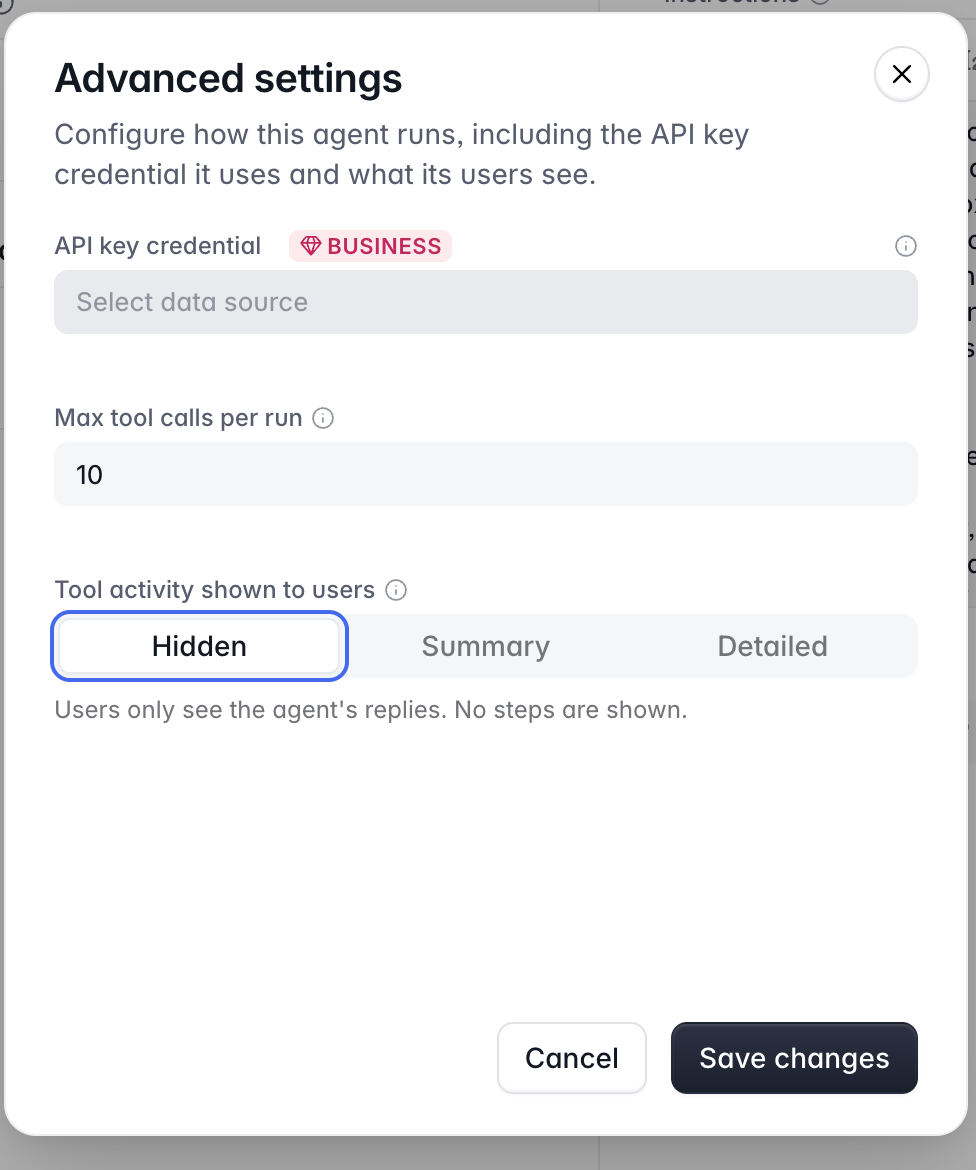
When you create an Agent for users to use in your app, it shows all of the tool calls it’s making to the end user when they chat with it. These tool calls in some cases include sensitive data like table IDs for Supabase (if using that with the Agent), error messages from the MCPs/integrated services etc which could contain IDs or keys you would not want an end user to see. There needs to be a way to hide all tool calls from the chat. I am shocked that Softr did not think of this when building this feature.
Good catch, this one matters more than it looks. Until Softr adds a hide option, treat anything the agent can call as visible to the end user and keep sensitive IDs and keys out of those tools entirely.
Agreed, anything an agent prints in the chat should be treated as user-visible, including table identifiers and error strings returned by connected tools. Until there is a setting to hide tool calls, I’d put a thin server-side wrapper in front of those tools: the agent only sees and returns a short, safe status or user-facing summary, and the wrapper logs raw identifiers and errors where end users cannot read them. That also means tightening tool descriptions so the model is not asked to show the request or echo identifiers. A hide option in the agent configuration is still the right product fix, because a wrapper is easy to forget when you add another tool.