@TobyMacLeod will be ready in 2-3 hours
1 Like
Thanks, @artur! Greatly appreciated. I’ve just done a couple test imports and there were some issues, but I’ll see if I can sort them out on my end as they appear to be related to data formatting.
Feel free to share it too with support they will pass to us. As it’s new and we rushed to get it out for you there might be some formatting issues specifically about Date and Datetime
1 Like
How did you get this to work? I cannot find any way to import CSV data into an existing table.
date/time is always a pain in the…. we imported a bunch of stuff in and I believe you need to do something like this…
**2023-11-07T05:31:56Z
ISO 8601 I believe**
Hi @tglatt - To import data into an existing Softr DB table, click the table tab and select “Import from CSV“.
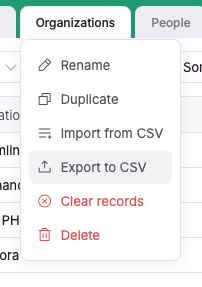
Thanks. Support was monitoring this as well and they had replied with the same guidance. Have you found a good way to update existing records in a table using CSV? I have not so I’m am using their workflow engine to loop through data I imported to a secondary table then update the correct records in the table to be updated.
No, I haven’t attempted to update existing records. I’m not sure if there is a way to efficiently do this without doing something similar to what you are already doing with Workflows.
@tglatt you could import using the softr workflows or n8n and then just do a query to find the record and if empty results insert else update.
Since you might hit throttle issues just set the try again on n8n and it will go well.
I know that this is an old thread, but I’ve just done this matching import by pulling the data into a separate table and then using the ‘run workflow’ button within Softr Database view. You have to create a workflow that does a Trigger > Find Record > Update record, but it essentially allows you to match your index field and then update all of the fields you want with one button. Plus you’ve then got that workflow ready for future imports.