Hello!
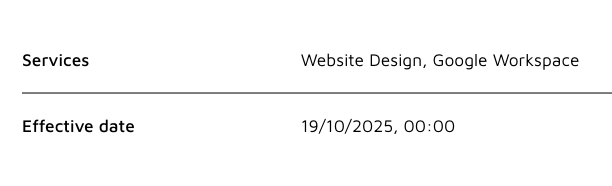
In the item details block is there any way to remove the border between fields (as below) either in settings or Custom CSS? I’d like it to feel like one continuous document. Custom CSS is not in my wheelhouse so I’m always grateful if anyone can share their expertise.
Thanks!
Hi Mike,
This could be done with the following code to be inserted in the page settings, custom code, header:
#item-details1 to be changed by your item-details block ID
<style>
#item-details1 .softr-fields-container div {
  border: none !important;
}

</style>
1 Like
You, sir, are a gentleman and a scholar.
Much appreciated!
1 Like