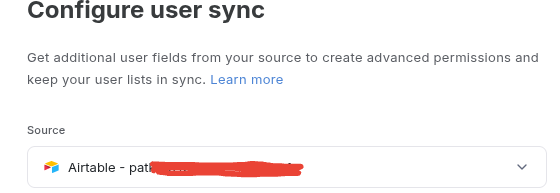
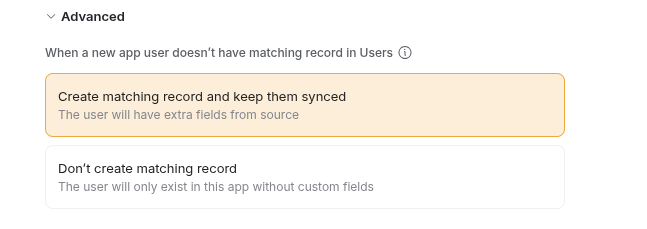
@jjenglert, @artur, @austinyang for more context and info about onboarding issues with Softr’s invitations, when users are manually added to an Airtable datasource and synced to Softr, Softr invitations don’t get sent, at least for an app in preview mode. My ‘Users’ table in Softr also confirms this:
Thanks JJ. Syuzanna just got back and reminded me. With all of the reports about unreliable native Softr notifications, is testing these features on a live, published app a best practice? Or would it be more prudent for builders to try them out in preview mode before publishing them on a live app?
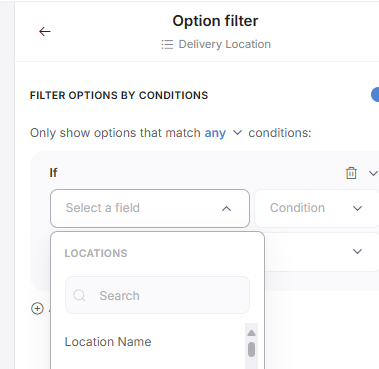
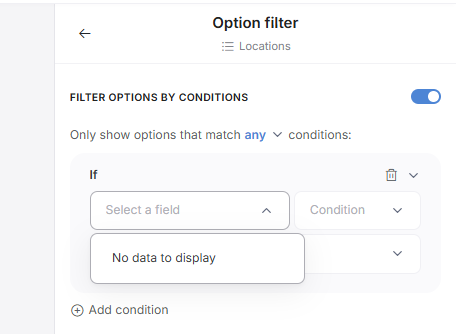
Hi guys, when I try and conditionally filter a dropdown selection in onboarding I get no data to filter by. I have a linked field with entries to choose from, or to create new if it is not visible, but I have no options by which to filter this in onboarding. This does work in the normal conditional forms.
I think this one would be best handled by our support team if you don’t mind contacting them there. This way you can give them access to your app and they can have an engineer view whats going on.
We have this issue aswell. @Jjenglert@artur This is another reason why we are having to stick to our own onboarding page where have the normal conditional form to enable filtering.
See below example of the issue based off the exact same table where onboarding flow form doesnt let you set conditional filtering.
If a user is sent a hyperlink to an app page (e.g. below) but are in a ‘non approved’ user group then they successfully get sent to the webpage. However this updates their onboarding status to ‘Completed’. The next time the user clicks on the link they are able to access the app (as Softr is seeing them as ‘Onboarded’) even though they’re still in ‘Non approved’ user group and never went through the Onboarding form. Why is the Onboarded status being updated to ‘Completed’ even though they arent ever seeing the onboarding page?
Users are able to reset password when their onboarded status is ‘Not Started’? This then triggers their onboarded status to ‘Completed’ and thus they are able to access the app.
also….
If an email does not exist in Softr Users table then should this not tell the user who is trying to sign in (i.e. This users does not exist) otherwise they think they’re waiting on a verification code to be sent to them? Im sure this used to be the case?
Thank you for reporting this issue. Our team was not able to reproduce it on our side, but we want to make sure we fully understand and resolve it.
Could you please try recording a short video showing the steps that lead to the problem and share it with support team via online chat? Please send this thread within the chat and the video.
This will help us investigate more effectively, thanks.
I’m setting up an onboarding page, and I noticed that my fields that are linked to Airtable aren’t editable on the onboarding form. Meaning, when I have the field set to a dropdown and synced with the source, the user (right now me) can see the previously selected options, but cannot view the other options nor change it. This is necessary for employees who have recently changed departments or office locations and need to edit their information during the onboarding process.
I have noticed that if I un-toggle “sync with source” I am able to view the drop down options and select one, but my original records are not displayed in the field as a default. Also, if we add more options in the future, I assume that it will not update the options as it is not synced with Softr.
What makes if more confusing is that the “title” field is a synced drop down and works perfectly, but the other drop downs (which are linked fields) do not.
Is anyone having this problem and is there an easy solution?
@artur, @austinyang ,@Jjenglert, how can we provide access to Terms and Privacy Policies for users during an onboarding flow? If users are linked to onboarding from an invitation, there doesn’t seem to be a way for them to access T&Cs before agreeing to them during the flow.
Following up @artur, since we did not hear back from Softr about this in the community. According to chat help, accessing Terms & Conditions and Privacy Policies from a Softr onboarding flow requires a custom coded workaround. Hopefully, links to T&C and PP’s get included into Softr’s onboarding flow configuration settings. This way, users that enter an app from an invitation link or any other way that bypasses sign up pages can review Terms & Conditions or Privacy Policies before they sign up to our Softr apps.
Onboarding flows right now are built with the permission of you requiring data from your users to power your app. And if we setup an onboarding flow, we’re assuming you need to collect this data to power your app. And to avoid your app from breaking (by not having this data) we force them to complete the onboarding form that you configured for them.
If this is not the flow you want, I’d suggest creating a different, voluntary flow for your users.
Yes we want to collect data from these users buy we also want them to ‘learn’ what they’re being onboarded to. It doesn’t make sense that they can’t see the public facing website (where the URL becomes the onboarding form). Or that they can’t read the Terms and Conditions from the onboarding page (where the url changed to onboarding form).
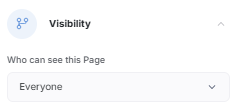
These are pages we choose to be visible to everyone so therefore they should still be visible to everyone. I agree they should never be allowed to log in without the onboarding form complete. Pages visible to everyone are for non logged in users. It would not matter giving visibility to these pages visible to everyone before or during onboarding.
Hey Ben We set up two pages visible to anyone; one for Ts&Cs and one for PP. We have a hyperlink on our onboarding page where user can click onto view these pages. The problem is it redirects them to the onboarding page as any page (even pages visible to everyone) redirects users to onboarding page once a user has started onboarding. See above discussion with @Jjenglert ^