I posted this the other day but for some reason it was blocked. The message said my post need to be approved and that I had one other post pending approval. Anyway…
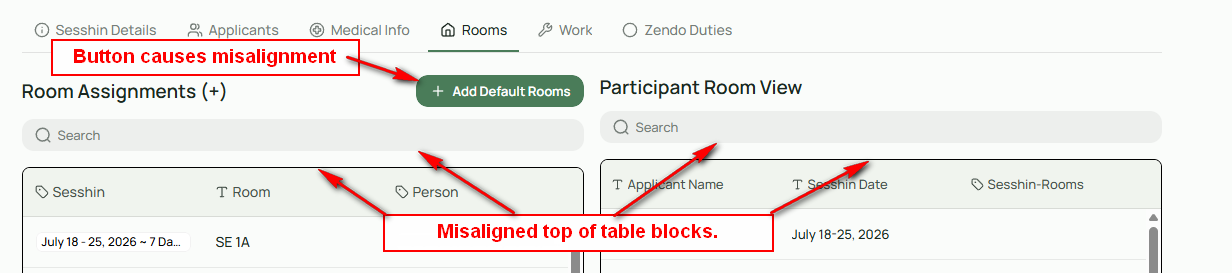
The image below shows two more or less identical table blocks. One has a button. The button causes the blocks to be misaligned vertically. Technically this may not be a bug, but I think you get my point - eh?
That one’s usually caused by the button adding extra height to the block header, so the tables start at different levels. A quick fix is to add a matching blank header space to the other block so both sit even.
That hover state is the giveaway. Set the button’s hover background and text colors to match the page background too, so it stays invisible even when the mouse passes over it.
Hi @PeterG, sorry about the earlier post getting stuck! New posts in Bug Reports go through a manual approval step, and yours sat in the queue longer than it should have. We’re keeping this thread since it already has the discussion, so I’ve removed the held duplicate. Thanks for flagging it, and thanks @letsbuildmyapp for jumping in with the workaround